Quick Start Guide
This article covers the very first steps of progression, explaining how resource extraction and machines work, and how to build a small starter factory. New players are also encouraged to familiarize themselves with the Interface article.
Manual Resource Collection
This section explains how to manually gather the resources required for early progression.
Finding Your Way
During the early game, you will need to collect several resources manually.
To avoid getting lost, use the map by pressing M. If you do lose your way, press Escape and select Teleport to Home. This will instantly return you to the Spawner on your starting platform.
Collecting Copper Ore
First, collect at least 50 units of copper ore.
Both Malachite and Chalcopyrite can be used, as they contain copper. These resources can be found in several forms:
- Resource clusters, visible on the map and on the compass
- Surface deposits directly in the terrain
Malachite surface deposits are green, while Chalcopyrite deposits are reddish-orange.
Both clusters and deposits can be mined using the Multitool. However:
- Ore clusters never deplete when mined manually
- Surface deposits are depleted when you dig them up
Collecting Fuel
Next, collect 30 units of any fuel.
The best fuel options at the start of the game are:
- Logs — obtained by cutting down trees
- Coal — mined from clusters or surface deposits, similar to ores
Returning to Base
After collecting the required resources, return to your base manually or by using Teleport to Home.
You are now ready to begin building your first machines.
Smelting Copper
This section explains how to smelt copper and produce your first metal plates.
Preparing Stone
At the start of the game, you have access to 99 units of stone, which is sufficient for early progression.
If you need more stone, you can:
- Mine stone rocks scattered across the world
- Dig underground until you reach the stone layer
-
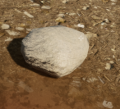 There are small stones.
 -
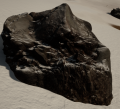 There are also large stones.
 -
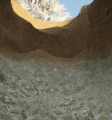 But there is still more stone underground.


Note that the Building Material recipe requires white stone. Red or dark stone variants cannot be used for this recipe.
Crafting the Furnace and Smelter
Return to your base and open the Inventory by pressing E. In the Catalog, select the Unlocked tab.
In the Stone category, craft the following machines by clicking on them with the Left Mouse Button:
Crafting progress is displayed in the lower-left corner of the screen. By clicking on an item currently being crafted, you can cancel its production.
Placing the Furnace

Select the Stone Furnace in your Inventory and close the Inventory.
You will see a placement preview of the furnace. To rotate the preview, press R.
Choose a location on your platform and place the furnace using the Left Mouse Button. If you are not satisfied with the placement, you can always remove the machine using the Multitool.
Notice the red circle on top of the furnace — this is its heat output.
Connecting the Smelter
Next, select the Stone Smelter in your Inventory and place it directly on top of the furnace. This connects the heat output of the furnace to the heat input of the smelter.
The furnace will now supply heat, allowing the smelter to operate.
Machine Inputs and Outputs
Tip: All machines have inputs and outputs.
- Inputs are usually displayed with a solid outline
- Outputs are usually displayed with a dashed outline
However, heat, kinetic, and electrical outputs are always shown with a solid outline. The machine tooltip clearly indicates which resources the machine accepts and which it outputs.
Smelting Copper
Finally, open the Stone Smelter using the Right Mouse Button and place the mined copper ore inside it. Place Fuel into the Stone Furnace.
If everything is set up correctly:
- The furnace will light up with a fire animation
- Molten metal will flow inside the smelter
- The smelter recipe progress bar will begin to fill
Once the progress bar is complete, you will receive the final product — a Copper Plate.
Researching New Machines
Before you can begin research, you must build and power a Computer so that it can start generating Computation.
Preparing for Research
Wait until at least 23 Copper Plates have been smelted, then collect them. After that, open the Catalog and craft the following machines:
Building the Research Setup
Now place the machines in sequence, matching their inputs and outputs by color.
- Place the Stone Furnace.
- Place the Copper Stirling Engine on top of the furnace.
- Attach the Copper Compact Generator to the Stirling Engine, connecting the yellow output to the yellow input.
- Finally, place the Copper Computer, connecting the blue output to the blue input.
Insert Fuel into the furnace at the bottom of the structure. Once powered, the computer will begin operating and generating Computation.

Unlocking Research
Open the Research tree in one of the following ways:
- Click the Research button in the lower-left corner of the screen
- Press the J hotkey
Your primary goal is to research Automatic Mining. However, this technology is locked behind other research nodes, so you must unlock them first.
Follow this order:
- Select Basic Machines and click Start Research in the upper-right corner of the screen.
- Add Automation to the research queue.
- Add Automatic Mining to the research queue.
Waiting for Completion
Once all required research has been queued, all that remains is to wait for the research to complete.
Mining
Now we don't want to keep going out and manually mining ore - it's time to automate that. Build the following : Three Copper Hand Generator; A Copper Drilling Rig; and a Stone Chest.
Next we want to find a place to drill for Chalcopyrite. Press M to open your Map. If the ore names are not shown, use the Options button, and select Ore Names. Find the nearest Chalcopyrite Ore to your home and walk over there.
Select the Drilling Rig from your inventory, but don't put it down just yet. Check the text at the top of the screen to make sure that you are over the Chalcopyrite deposit. Next, select your Basic Platform blocks and build a 6x6 platform. You can Drag to build an area or a line of blocks. You could build directly on the ground, but it's easier to keep things tidy on platforms. If there's any dirt on top of the platform, the multitool can remove it. Now place your drilling rig, checking that it's going to mine the correct ore.
On the back of the rig, there are 3 Kinetic inputs. Attach your hand generators to these (match the circles using R to rotate) and once placed, use Left Clicks to wind them up.
On the other side of the rig, there's a square output port. Put your Chest right in front of it, touching the rig. Now the rig will happy mine ore for you while you are away doing other things.
Next Steps (Homework)
Here's some ideas that you might want to do to move forward.
- Feed and Empty your copper smelter. Use a Chest and a Robot Arm to feed ore into the smelter and take out copper plates. Use Conveyors to move items from place to place.
- Replace the drilling rig hand generators with sterling engines. You'll need a fuel source (An Atmospheric Condenser to feed water into an Automatic Farm to feed wood into a Furnace)
- Make copper more efficient. Middle Mouse click on some Chalcopyrite ore. To the right is a series of machines that prosses the ore into different forms. Multiple plates can be made from a single ore.
- Build one of every Copper object. Understand what they do, and how they might fit into production lines. Middle Clicking on a machine will tell you how it's made and what it can do.
- Move from Copper into Steel. As you move up the resource tree, your machines will become faster, but need more energy.
Closing
We hope you find this guide useful. If you have any comments or suggestions, please feel free to put them into the Talk page, and we'll review them. Also, if you have any questions, we have a Discord channel here : General Discord Channel